> ## Documentation Index
> Fetch the complete documentation index at: https://docs.hitl.sh/llms.txt
> Use this file to discover all available pages before exploring further.
# n8n Integration
> Automate your human-in-the-loop workflows with n8n's powerful visual workflow builder and HITL.sh integration
# n8n Integration
Integrate HITL.sh with n8n to create powerful automated workflows that seamlessly incorporate human decision-making. Perfect for content moderation, approval workflows, and quality assurance processes.
Before configuring n8n, install the HITL.sh mobile app ([App Store](https://apps.apple.com/us/app/hitl-human-in-the-loop/id6752878072) | [Google Play](https://play.google.com/store/apps/details?id=hitl.sh.app)) since it's an integral part of the setup.
 ## Why Use n8n with HITL.sh?
Design complex automation workflows with an intuitive drag-and-drop interface
Connect HITL.sh with popular services like Slack, Gmail, databases, and more
Deploy on your own infrastructure for complete data control and privacy
Fully transparent codebase you can customize and extend to your needs
## Installation Methods
n8n offers two ways to add HITL.sh integration to your workflows:
### Install via Community Nodes
The easiest way to get started with HITL.sh in n8n:
Navigate to **Settings** → **Community Nodes** in your n8n instance
Search for `@hitlsh/n8n-nodes-hitl` and click **Install**
## Why Use n8n with HITL.sh?
Design complex automation workflows with an intuitive drag-and-drop interface
Connect HITL.sh with popular services like Slack, Gmail, databases, and more
Deploy on your own infrastructure for complete data control and privacy
Fully transparent codebase you can customize and extend to your needs
## Installation Methods
n8n offers two ways to add HITL.sh integration to your workflows:
### Install via Community Nodes
The easiest way to get started with HITL.sh in n8n:
Navigate to **Settings** → **Community Nodes** in your n8n instance
Search for `@hitlsh/n8n-nodes-hitl` and click **Install**
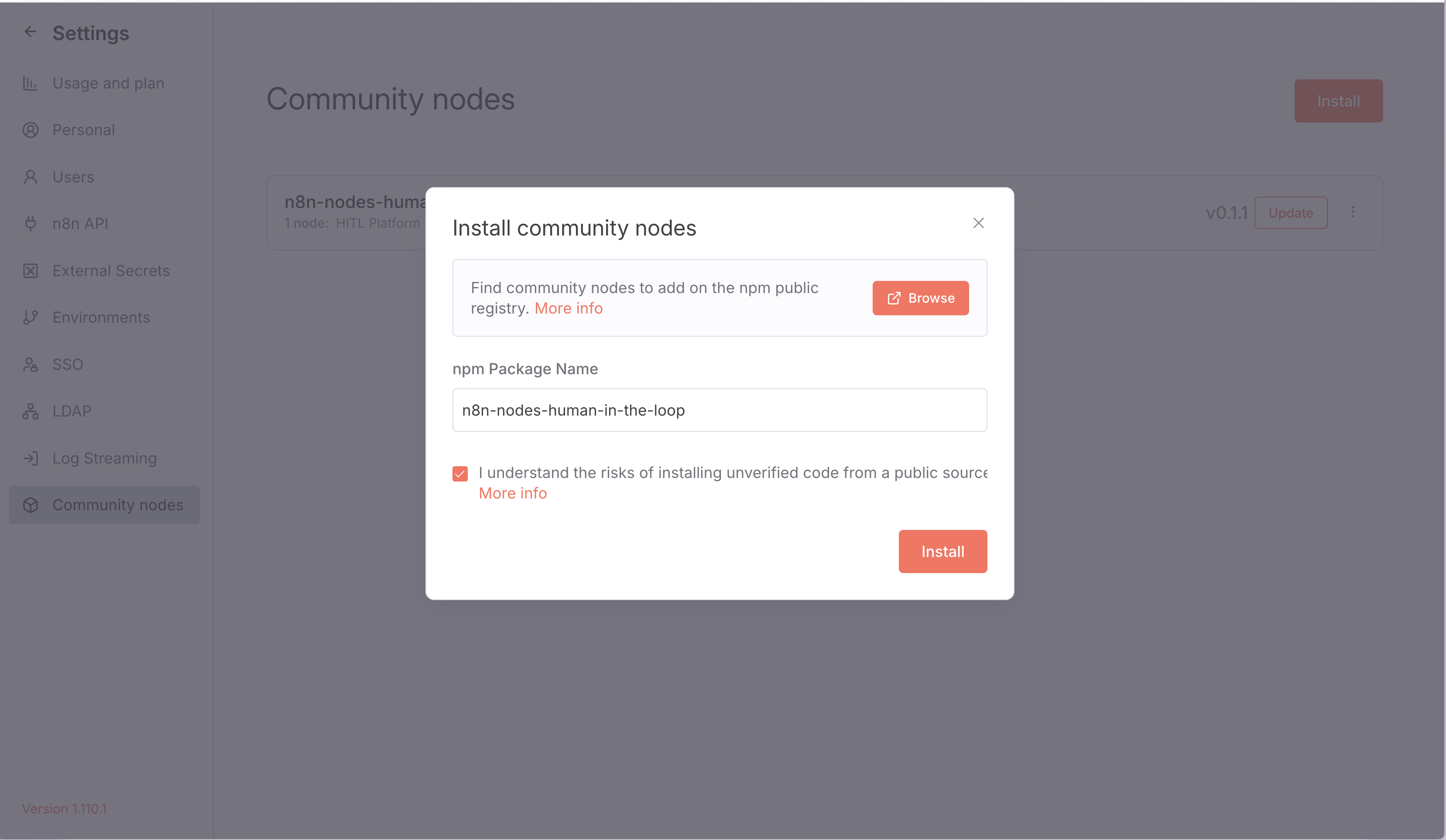 Restart your n8n instance to load the new nodes
The HITL.sh nodes will now appear in your node palette
Community Nodes are the recommended installation method as they receive automatic updates and simplified configuration.
### Install via NPM
For self-hosted n8n instances with custom node installations:
```bash theme={null}
# Navigate to your n8n custom nodes directory
cd ~/.n8n/nodes
# Install the HITL.sh node package
npm install @hitlsh/n8n-nodes-hitl
# Restart n8n
n8n restart
```
**Directory Structure:**
```
~/.n8n/
├── nodes/
│ └── @hitlsh/
│ └── n8n-nodes-hitl/
└── config
```
Self-hosted NPM installation requires manual updates when new versions are released.
## Setting Up Credentials
Configure your HITL.sh API credentials in n8n:
1. Log in to your HITL.sh dashboard at [my.hitl.sh](https://my.hitl.sh)
2. Navigate to **Settings** → **API Keys**
3. Click **Generate New API Key**
4. Copy your API key (keep it secure!)
1. In n8n, go to **Credentials** → **New**
2. Search for "HITL.sh"
3. Paste your API key
Restart your n8n instance to load the new nodes
The HITL.sh nodes will now appear in your node palette
Community Nodes are the recommended installation method as they receive automatic updates and simplified configuration.
### Install via NPM
For self-hosted n8n instances with custom node installations:
```bash theme={null}
# Navigate to your n8n custom nodes directory
cd ~/.n8n/nodes
# Install the HITL.sh node package
npm install @hitlsh/n8n-nodes-hitl
# Restart n8n
n8n restart
```
**Directory Structure:**
```
~/.n8n/
├── nodes/
│ └── @hitlsh/
│ └── n8n-nodes-hitl/
└── config
```
Self-hosted NPM installation requires manual updates when new versions are released.
## Setting Up Credentials
Configure your HITL.sh API credentials in n8n:
1. Log in to your HITL.sh dashboard at [my.hitl.sh](https://my.hitl.sh)
2. Navigate to **Settings** → **API Keys**
3. Click **Generate New API Key**
4. Copy your API key (keep it secure!)
1. In n8n, go to **Credentials** → **New**
2. Search for "HITL.sh"
3. Paste your API key
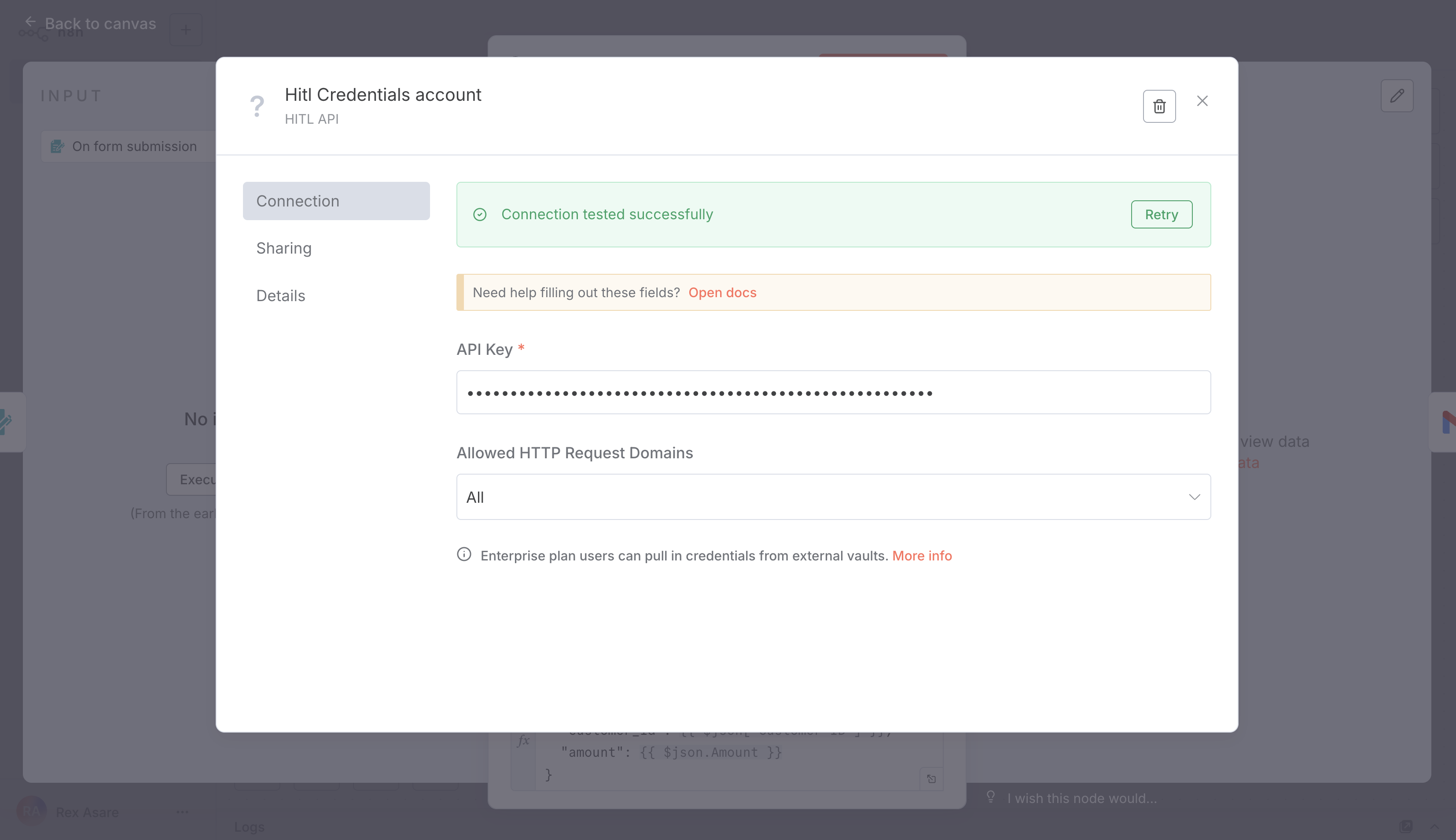 Click **Test Credentials** to verify the connection
## Available Response Types
HITL.sh n8n nodes support six different response types for collecting structured feedback from reviewers:
Free-form text input with character limits:
```json theme={null}
{
"response_type": "text",
"response_config": {
"placeholder": "Enter your feedback...",
"min_length": 10,
"max_length": 500,
"required": true
}
}
```
**Response format:** `"response_data": "The content looks good but needs minor edits..."`
Choose one option from a predefined list:
```json theme={null}
{
"response_type": "single_select",
"response_config": {
"options": ["Approve", "Reject", "Needs Review"]
}
}
```
**Response format:** `"response_data": "approve"`
Choose multiple options from a list:
```json theme={null}
{
"response_type": "multi_select",
"response_config": {
"options": ["Grammar Issues", "Factual Errors", "Tone Problems"],
"max_selections": 3
}
}
```
**Response format:** `"response_data": ["grammar_issues", "tone_problems"]`
Numeric rating on a custom scale:
```json theme={null}
{
"response_type": "rating",
"response_config": {
"scale_min": 1,
"scale_max": 10,
"scale_step": 0.5
}
}
```
**Response format:** `"response_data": 7.5`
Numeric input with validation:
```json theme={null}
{
"response_type": "number",
"response_config": {
"min_value": 0,
"max_value": 1000,
"decimal_places": 2
}
}
```
**Response format:** `"response_data": 299.99`
Simple yes/no decisions:
```json theme={null}
{
"response_type": "boolean",
"response_config": {
"true_label": "Approved",
"false_label": "Rejected"
}
}
```
**Response format:** `"response_data": true`
## Configuring the HITL.sh Node
Add the HITL.sh node to your workflow and configure it:
Click **Test Credentials** to verify the connection
## Available Response Types
HITL.sh n8n nodes support six different response types for collecting structured feedback from reviewers:
Free-form text input with character limits:
```json theme={null}
{
"response_type": "text",
"response_config": {
"placeholder": "Enter your feedback...",
"min_length": 10,
"max_length": 500,
"required": true
}
}
```
**Response format:** `"response_data": "The content looks good but needs minor edits..."`
Choose one option from a predefined list:
```json theme={null}
{
"response_type": "single_select",
"response_config": {
"options": ["Approve", "Reject", "Needs Review"]
}
}
```
**Response format:** `"response_data": "approve"`
Choose multiple options from a list:
```json theme={null}
{
"response_type": "multi_select",
"response_config": {
"options": ["Grammar Issues", "Factual Errors", "Tone Problems"],
"max_selections": 3
}
}
```
**Response format:** `"response_data": ["grammar_issues", "tone_problems"]`
Numeric rating on a custom scale:
```json theme={null}
{
"response_type": "rating",
"response_config": {
"scale_min": 1,
"scale_max": 10,
"scale_step": 0.5
}
}
```
**Response format:** `"response_data": 7.5`
Numeric input with validation:
```json theme={null}
{
"response_type": "number",
"response_config": {
"min_value": 0,
"max_value": 1000,
"decimal_places": 2
}
}
```
**Response format:** `"response_data": 299.99`
Simple yes/no decisions:
```json theme={null}
{
"response_type": "boolean",
"response_config": {
"true_label": "Approved",
"false_label": "Rejected"
}
}
```
**Response format:** `"response_data": true`
## Configuring the HITL.sh Node
Add the HITL.sh node to your workflow and configure it:
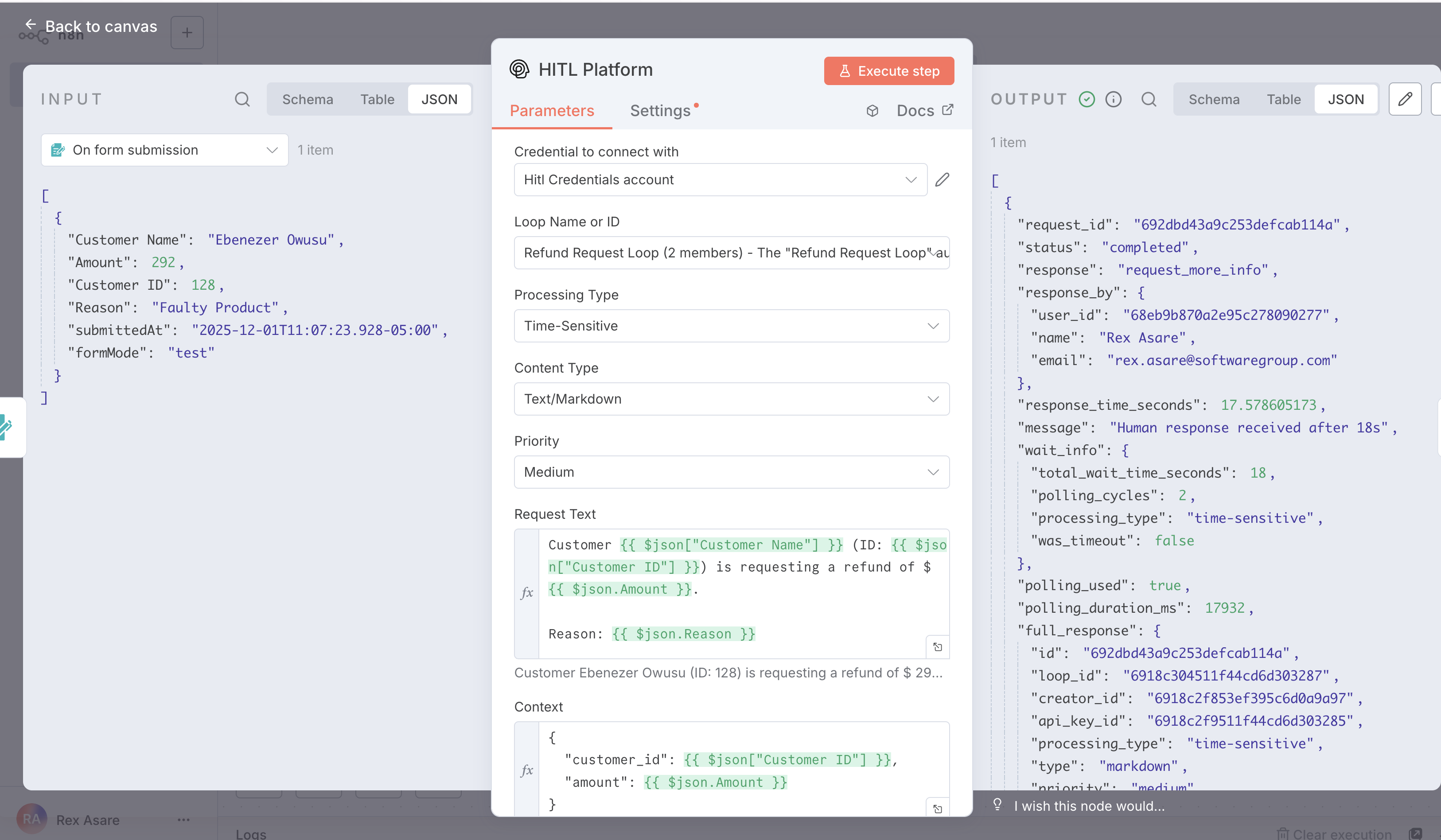 ### Required Parameters
The unique identifier of your HITL loop where reviewers will process the request
The content or question you want reviewers to evaluate
Choose from: text, single\_select, multi\_select, rating, number, boolean
Configuration object specific to your chosen response type
### Optional Parameters
`time-sensitive` or `deferred` - determines urgency of the request
`low`, `medium`, `high`, or `critical` - affects reviewer notification
Time limit before default response is used (60-86400 seconds)
Fallback value if request times out (format matches response type)
Additional metadata to help reviewers make informed decisions
## Response Data Structure
When a reviewer completes a request, you'll receive comprehensive response data:
### Required Parameters
The unique identifier of your HITL loop where reviewers will process the request
The content or question you want reviewers to evaluate
Choose from: text, single\_select, multi\_select, rating, number, boolean
Configuration object specific to your chosen response type
### Optional Parameters
`time-sensitive` or `deferred` - determines urgency of the request
`low`, `medium`, `high`, or `critical` - affects reviewer notification
Time limit before default response is used (60-86400 seconds)
Fallback value if request times out (format matches response type)
Additional metadata to help reviewers make informed decisions
## Response Data Structure
When a reviewer completes a request, you'll receive comprehensive response data:
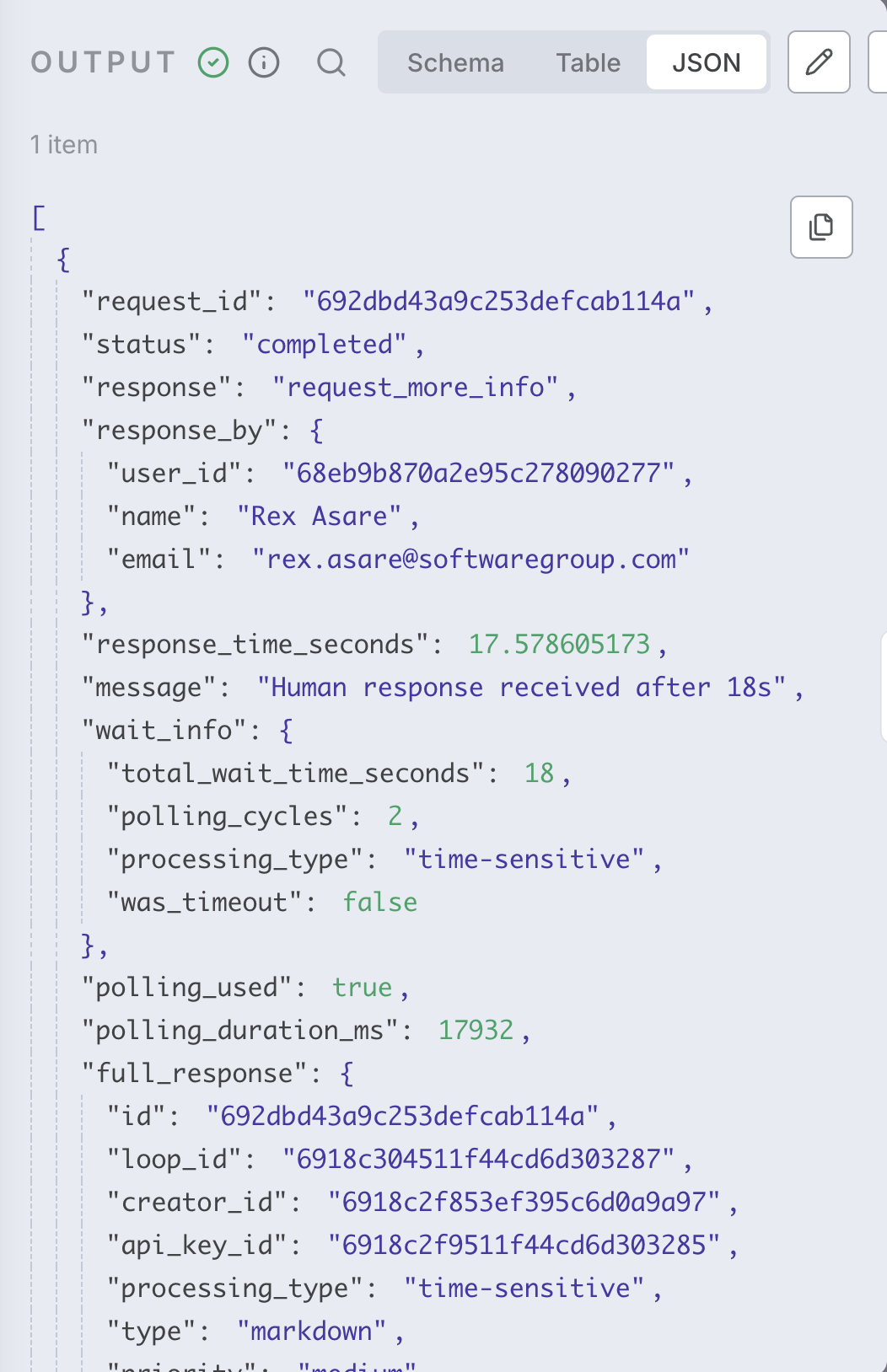 ```json theme={null}
{
"request_id": "65f1234567890abcdef12348",
"loop_id": "65f1234567890abcdef12345",
"status": "completed",
"priority": "high",
"response_data": "approve",
"response_by_user": {
"id": "65f1234567890abcdef12350",
"name": "John Reviewer",
"email": "john@example.com"
},
"response_time_seconds": 145.5,
"context": {
"user_id": "user_123",
"post_id": "post_456"
},
"created_at": "2024-03-15T10:30:00Z",
"updated_at": "2024-03-15T10:32:25Z"
}
```
## Example Workflow: Customer Refund Approval
Here's a complete workflow that automatically processes refund requests with human oversight:
```json theme={null}
{
"request_id": "65f1234567890abcdef12348",
"loop_id": "65f1234567890abcdef12345",
"status": "completed",
"priority": "high",
"response_data": "approve",
"response_by_user": {
"id": "65f1234567890abcdef12350",
"name": "John Reviewer",
"email": "john@example.com"
},
"response_time_seconds": 145.5,
"context": {
"user_id": "user_123",
"post_id": "post_456"
},
"created_at": "2024-03-15T10:30:00Z",
"updated_at": "2024-03-15T10:32:25Z"
}
```
## Example Workflow: Customer Refund Approval
Here's a complete workflow that automatically processes refund requests with human oversight:
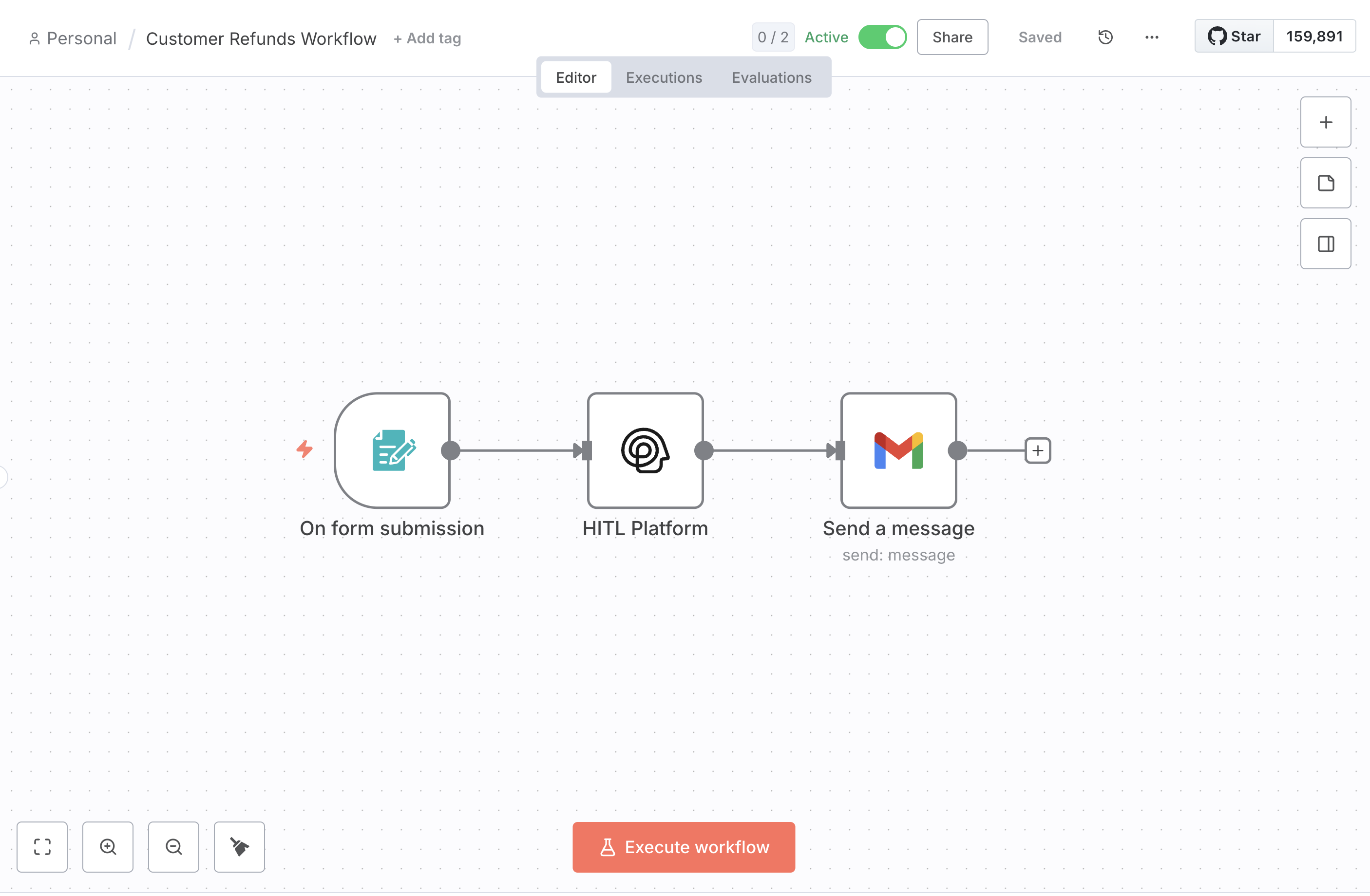 ### Workflow Steps
Webhook or form submission triggers when customer requests refund
Conditional node routes based on refund amount:
* Under \$50: Auto-approve
* $50-$500: Standard review
* Over \$500: Priority review
Send to human reviewer with refund details and customer history
```json theme={null}
{
"loop_id": "refund_approvals",
"request_text": "Customer requesting ${{ $json.amount }} refund\nReason: {{ $json.reason }}\nCustomer lifetime value: ${{ $json.customer_ltv }}",
"response_type": "single_select",
"response_config": {
"options": ["Approve Full", "Approve Partial", "Deny", "Escalate"]
},
"priority": "{{ $json.amount > 500 ? 'high' : 'medium' }}",
"context": {
"customer_id": "{{ $json.customer_id }}",
"order_id": "{{ $json.order_id }}",
"amount": "{{ $json.amount }}"
}
}
```
Switch node routes based on human decision
* **Approved**: Process refund and send confirmation
* **Denied**: Send explanation email
* **Escalate**: Notify management team
Log decision in CRM/database for audit trail
## Best Practices
Provide reviewers with all context needed to make informed decisions
Set realistic timeouts based on request urgency and reviewer availability
Always specify conservative default responses for timeout scenarios
Add error nodes to handle API failures gracefully
## Troubleshooting
**Solution**:
* Verify installation completed successfully
* Restart n8n instance
* Check n8n logs for installation errors
**Solution**:
* Verify API key is correct
* Check API key has required permissions
* Ensure API key hasn't expired
**Solution**:
* Increase timeout\_seconds parameter
* Verify loop has active reviewers
* Check reviewer notification settings
## Next Steps
Learn about our Zapier integration for simpler automation
Explore Make.com integration with webhook triggers
View complete API documentation for custom integrations
Join our Discord community for help and examples
### Workflow Steps
Webhook or form submission triggers when customer requests refund
Conditional node routes based on refund amount:
* Under \$50: Auto-approve
* $50-$500: Standard review
* Over \$500: Priority review
Send to human reviewer with refund details and customer history
```json theme={null}
{
"loop_id": "refund_approvals",
"request_text": "Customer requesting ${{ $json.amount }} refund\nReason: {{ $json.reason }}\nCustomer lifetime value: ${{ $json.customer_ltv }}",
"response_type": "single_select",
"response_config": {
"options": ["Approve Full", "Approve Partial", "Deny", "Escalate"]
},
"priority": "{{ $json.amount > 500 ? 'high' : 'medium' }}",
"context": {
"customer_id": "{{ $json.customer_id }}",
"order_id": "{{ $json.order_id }}",
"amount": "{{ $json.amount }}"
}
}
```
Switch node routes based on human decision
* **Approved**: Process refund and send confirmation
* **Denied**: Send explanation email
* **Escalate**: Notify management team
Log decision in CRM/database for audit trail
## Best Practices
Provide reviewers with all context needed to make informed decisions
Set realistic timeouts based on request urgency and reviewer availability
Always specify conservative default responses for timeout scenarios
Add error nodes to handle API failures gracefully
## Troubleshooting
**Solution**:
* Verify installation completed successfully
* Restart n8n instance
* Check n8n logs for installation errors
**Solution**:
* Verify API key is correct
* Check API key has required permissions
* Ensure API key hasn't expired
**Solution**:
* Increase timeout\_seconds parameter
* Verify loop has active reviewers
* Check reviewer notification settings
## Next Steps
Learn about our Zapier integration for simpler automation
Explore Make.com integration with webhook triggers
View complete API documentation for custom integrations
Join our Discord community for help and examples